

Every operations team has one: the spreadsheet other people are supposed to feed. Leave requests belong in the HR tracker, stock counts in the inventory sheet. An Excel data entry form is the obvious fix, and the catch is just as obvious: to let people enter data, most approaches make you hand over the file. And the file contains everything. The leave tracker also holds every colleague's remaining days. The inventory sheet also holds purchase prices and margins. You want input, not an audience.
The real problem is visibility, not data entry
Sending the workbook around is the worst version of this. Hidden tabs and protected sheets look like access control, but hiding a tab is a display setting, and sheet protection can be stripped in seconds with tools anyone can search for. Once the file leaves your outbox it is a copy, and a copy cannot be revoked. You will never know how far it traveled or who opened it out of curiosity.
The usual tool escapes trade one problem for another. Google Forms keeps your sheet private, but it only appends flat rows to a response sheet: none of your lookups run, no validation fires, and the person submitting gets no calculated feedback. AppSheet can handle real logic, but you rebuild that logic in its expression language, and per-user pricing gets awkward fast when the "users" are forty warehouse colleagues who each submit one stock count a week.
An Excel data entry form that hides the sheet
Granular sharing approaches it from the other side: instead of protecting a file you hand out, you publish only the cells that need input, as a small web app. In airrange you pick the input cells from your workbook, place them on a page as form fields, and share the result as a link. The person who opens it sees the fields and whatever results you decide to show. Nothing else. The formulas and the rest of the workbook are never delivered to their browser, so there is nothing to unhide, unprotect, or forward.
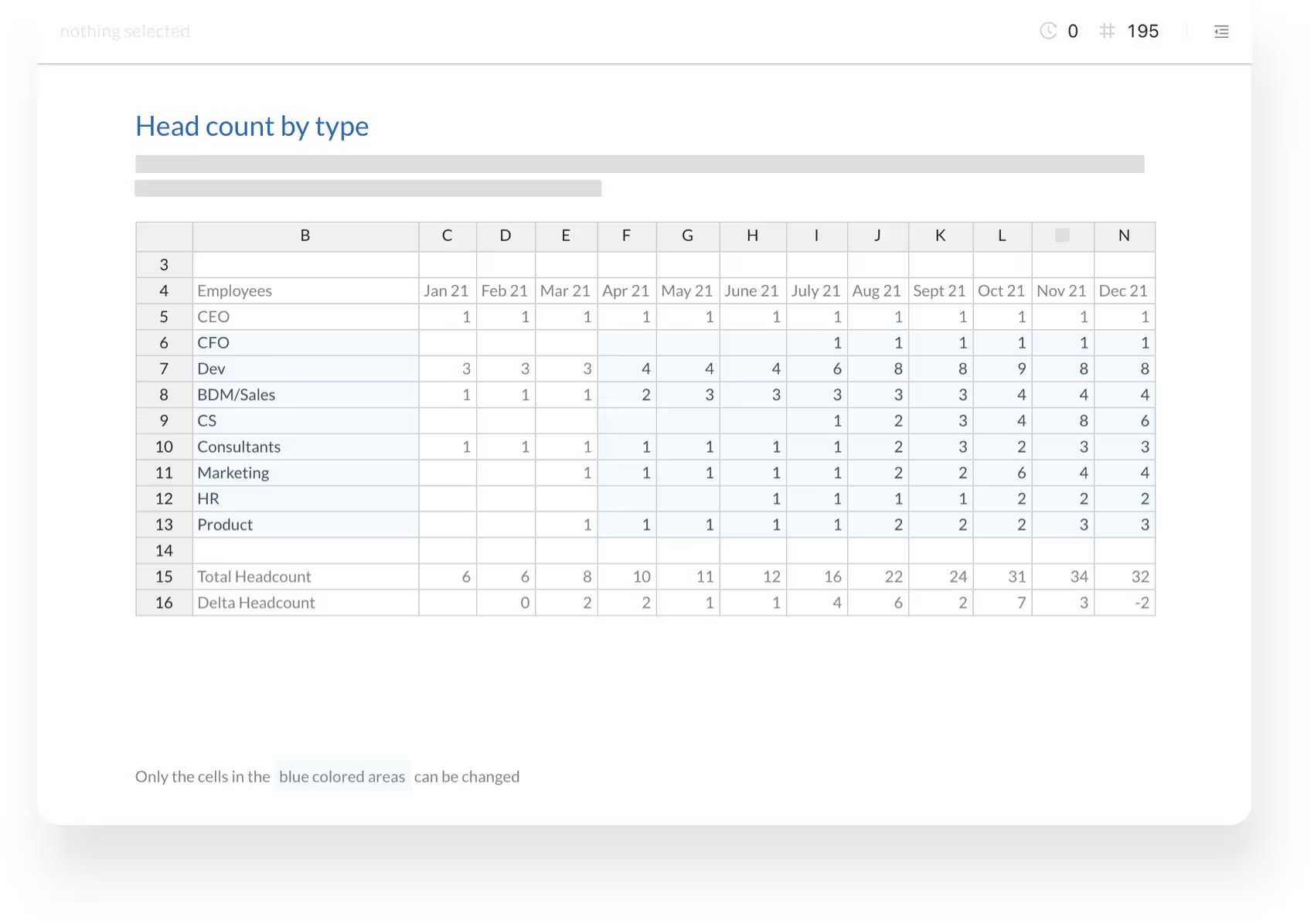
The form runs in the browser, so contributors need neither Excel nor an account. Your model still does the work: a quantity typed into the form lands in the cell your formulas read from, so plausibility checks and price lookups react while the person is still typing, not three days later in a cleanup pass. The granular sharing page shows this range-first model in more detail, and the Excel form builder page covers the building blocks.
You decide who may enter data
Each share link carries its own access level, and there are four. "Anyone with the link" is for public forms. "Anyone with the link (login required)" asks visitors to verify their email with a 6-digit passcode before the form opens, so you know who submitted what without managing passwords or registrations. "Specific people or domains" limits the link to the addresses or company domains you list. "Only my company" accepts anyone with a Microsoft work sign-in from your own organization, which is usually the right setting for internal HR forms.
On top of that, every link is either editable or read-only, and you can create several links for the same app. In practice that means one editable link for the team entering counts and one read-only link for the manager who only checks totals, both served from the same underlying sheet.
Where the entries land
Submissions do not float in a third-party response sheet. The simple route is a table inside airrange: an Add to Table flow appends each submission as a row (a table holds up to 50,000 of them), and you review, correct, and export the entries before they touch anything important. The direct route sends values into the master workbook itself: the airrange add-in for Excel receives each submission and merges the values at the target addresses you define per field, down to sheet, column, and row. The master file stays where it is, on your machine or in your tenant, and you merge on your terms. The mechanics of forms, required fields, and flows are covered step by step in the Excel form builder guide.
The same pattern for Google Sheets
A Google Sheets data entry form works the same way, with one honest caveat. You can feed an airrange table straight from a Sheet, either from a share link or from your Google account, and published apps pick up freshly synced values on their next load. Synced tables are read-only, though: they mirror the Sheet, so apps collect submissions in an airrange table rather than writing into the Sheet directly. For price lists and reference data that live in Google Sheets, the sync does exactly what a form backend needs.
What HR data never does: leave your control
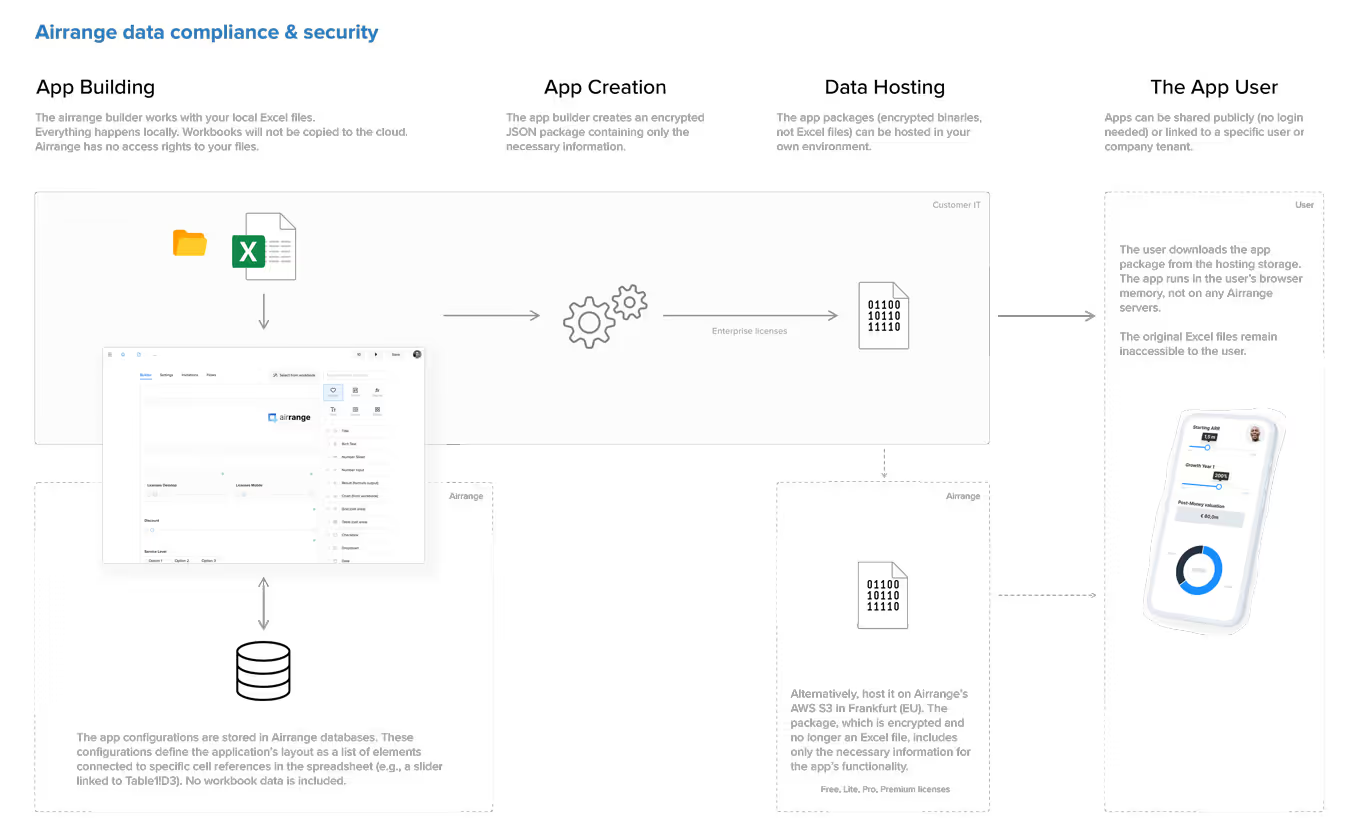
Leave requests and inventory data are the kind of records that make compliance teams ask where things are stored. There is a concrete answer. When you share a form, airrange bundles only the formulas and data that app actually needs into an encrypted Calculation Package, never your full workbook; local files are not uploaded at all. Entries from contributors are encrypted and stored in the EU, on AWS in Frankfurt, and on Enterprise plans the encrypted packages can live on storage you bring yourself. The compliance overview lists the certifications and storage models.
Start with the sheet people already feed
Pick the one spreadsheet that colleagues currently fill by email and build its entry form first: the leave tracker or the stock count sheet is usually done in an afternoon, because the logic already exists. Share the link at the right access level, watch the first real submissions arrive, and retire the "please send me your numbers" email. The workbook goes back to being what it should have been all along, a backend only you can open.