

Somewhere in your company there is a spreadsheet that other people feed. Order requests, maintenance reports, project hours, sample counts from the field. The model lives in Excel, but the data arrives by email, chat message, or paper form, and someone types it in by hand. An Excel form builder promises to fix that: give people a clean online form, and let the entries land in the spreadsheet on their own. The catch is that most form tools only get you halfway there.
Why forms and spreadsheets drift apart
The standard workaround is Google Forms or a similar survey tool. It collects answers reliably, but it writes them into its own flat response sheet: a plain list of rows with no connection to your actual workbook. Your validations don't run. Your lookups don't fire. The price calculation that should happen the moment an order comes in doesn't happen, because the form tool has never seen your formulas. So a person sits between the response sheet and the real model, copying rows across and fixing what the form let through.
That person is the hidden cost. Re-entry is slow, it happens in batches (so the model is always a few days stale), and every manual copy is a chance for a typo that surfaces weeks later as a wrong total. The problem isn't the form. It's the gap between the form and the spreadsheet logic.
An online form to Excel, without the glue code
The approach airrange takes is different: the form is not a separate tool that forwards data to a spreadsheet — the form is the spreadsheet, wearing a different interface. You upload your workbook (or connect it from Microsoft 365), then build the form by placing input elements that bind directly to cells. When someone types a quantity into the form, the value lands in the cell your formulas already read from, and everything downstream recalculates immediately: the price lookup, the plausibility check, the delivery estimate.
This is what separates an Excel form builder from a survey tool with an export button. There is no Zapier step between "user submits" and "model calculates", because there is nothing to connect: the logic and the form were never separate systems. If the workbook rejects a value or flags a combination as invalid, the person filling out the form can see that while they are still filling it out, not three days later when someone processes the batch.
Building the form: fields, rules, and bulk entry
The form itself is assembled from a toolbox of elements: text and number inputs, dropdowns, date pickers, an email input, checkboxes. Each one is linked to a cell in your model. You lay them out on a page, label them, and the data entry form exists.
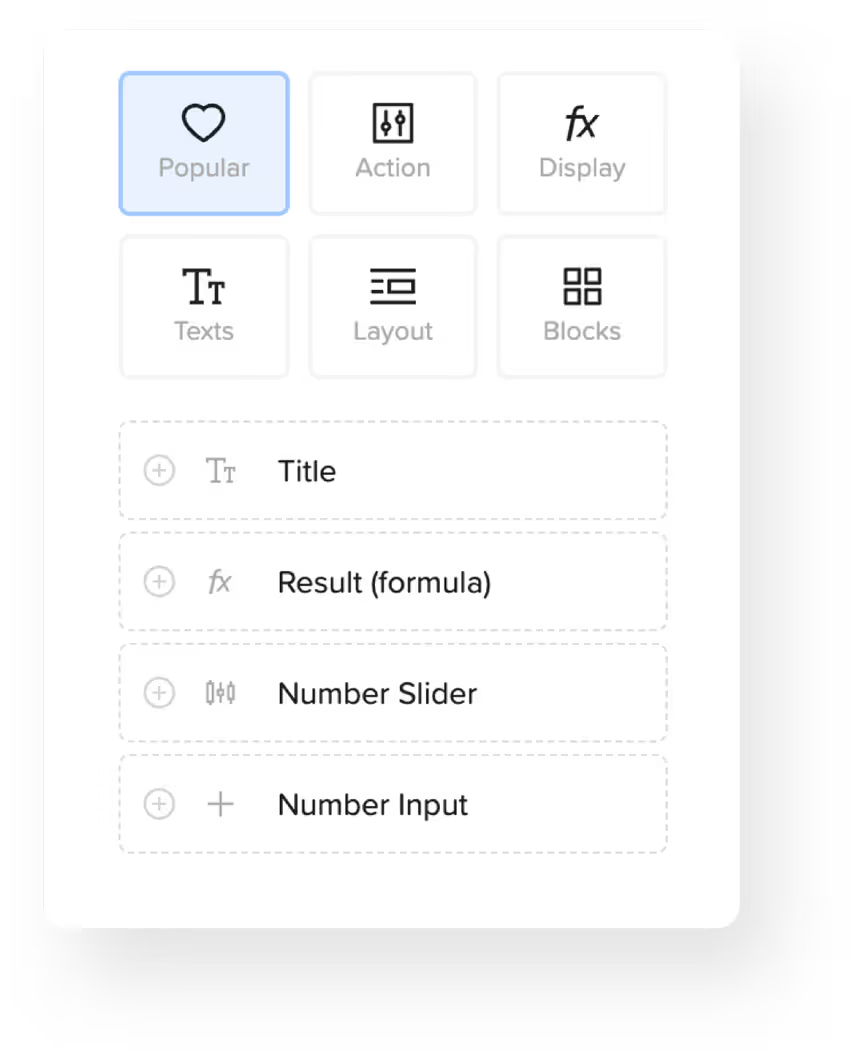
Two details matter more in practice than the field list. The first is enforcing complete submissions. In airrange, the submit button has a setting called "Disabled until these fields are filled": you pick the fields that are mandatory, and the button stays greyed out until each one has a value. The email input counts as filled only when it contains a valid address, so a half-typed one keeps the button locked. No error popups to design, no validation rules to script.
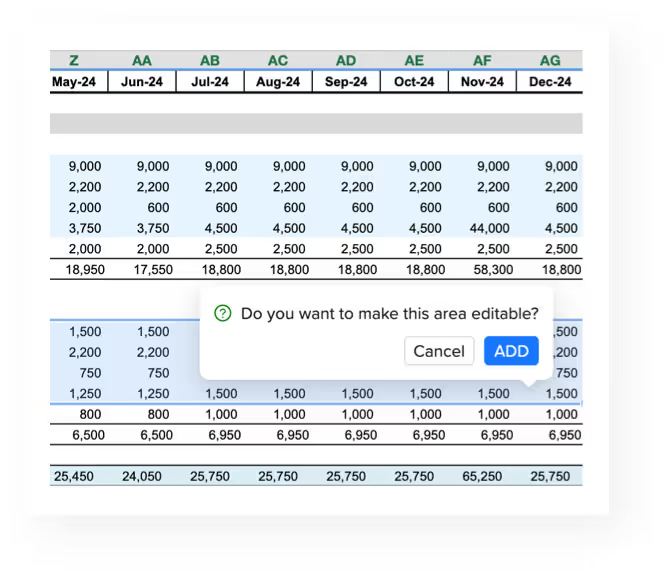
The second is bulk entry. A field-by-field form is right for single requests, but sometimes people need to enter twenty rows at once: a stock count, a weekly report. For that there is the Editable Grid, which places a live worksheet range into the form. It starts out read-only; in the Grid Wizard you select the cells users may change and click "Mark selection editable". Everything outside stays locked, formulas stay invisible, and users can paste a whole block of values straight from their own Excel into the editable cells.
Where submissions go
Collecting entries is a one-click flow, not an integration project. The simplest option is the Add to table flow: every submission is appended as a row to a table inside airrange, where you can review entries, fix a typo, delete test rows, and export the data. If that table is also connected to your workbook as a sheet, it reloads right after each submission, and a counter or lookup over the entries updates in the running form about a second later. The form can show "42 requests this week" without anyone refreshing anything.
When the data needs to travel further, a web endpoint flow posts each submission as JSON to any URL: a Make, Zapier, or n8n webhook, or your own backend. The JSON keys come from the field names, and you can set an alias per field if your receiving system expects cleaner keys. There is also a plain email flow that mails each submission to an address you choose. You can stack several flows on the same button: store the row, notify the team, feed the webhook.
Closing the loop: back into the master workbook
For many teams the final destination is not a table in the cloud but the master workbook on the controller's machine. That is what submit routing does: form inputs sync back into the Excel cells you choose. Each input element defines a target address in the receiving workbook (sheet, column, and row), fixed or driven by a variable, so a category chosen in the form can determine which sheet the value lands on. On your side, the airrange add-in for Excel receives the submission and merges the values in. The people filling out the form never need the add-in, or Excel, or an account. They just use the form in the browser.
Submit routing is part of the Premium plan (the pricing page has the current tiers). The plan question that usually matters more, though, is the one airrange doesn't ask: there is no metering on views or submissions. Whether ten colleagues or ten thousand customers use your form, the price is the same — plans differ by what you can build, not by how many people fill it in.
Where to start
Pick the spreadsheet that other people feed today and count the manual steps between "someone has data" and "the model has data". If the answer is more than zero, that workbook is a form waiting to happen: the inputs are the cells people already fill in, the validations are the checks someone currently does by eye, and the calculations are already written. Turning it into a web form is a matter of placing elements, not rebuilding logic; the Excel to web apps feature tour shows the full path. Your formulas have been doing the hard part for years. Let them receive the data directly.