

Most posts about a sales forecast template end at the download link. You get a sheet with twelve months across the top, reps or regions down the side, and a total the CFO can plan around. Useful, but the grid was never the hard part. The forecast lives or dies in the two weeks after you build it, when twelve regional owners each have to put their numbers in and you have to trust what comes back. This post covers both halves: the structure of a bottom-up sales forecast template that holds up under questioning, and a way to collect the inputs that does not involve emailing twelve copies of your workbook.
What a good sales forecast template contains
Build bottom-up. A top-down forecast (last year plus 10%) is fine for a board slide, but it gives a regional manager nothing to commit to and nothing to be measured against. A bottom-up sales forecast template starts from pipeline a named person owns, which is also why collecting the inputs matters so much later.
Four sheets are enough:
- Inputs: one block per rep or region: open pipeline by stage, average deal size, win rate per stage, expected close month. These are the only cells anyone outside sales ops should ever touch.
- Assumptions: a single labeled block for everything that applies across regions: ramp time for new reps, seasonality factors per month, a price change taking effect in Q3. On its own sheet, so a changed assumption is visible in one place instead of buried inside a formula.
- Trend: a sanity check against history. If the bottom-up number says next quarter will be 40% above the trend line, somebody should be able to say why.
- Roll-up: one row per month, built with SUMIFS over the input blocks, multiplied by the assumption factors. No typed numbers on this sheet, ever. If a cell on the roll-up contains a constant, the template has already failed.
For the trend sheet, FORECAST.LINEAR does the work. With monthly revenue history in B2:B13 and the month numbers 1 to 12 in A2:A13, the projection for month 14 is =FORECAST.LINEAR(14, B2:B13, A2:A13). Drag it across the forecast horizon and you have a straight-line baseline to hold the bottom-up number against.
Excel also offers FORECAST.ETS, which adds seasonality detection. Before you build the whole template on it, consider where the template will run. If you later publish the workbook as a web app with airrange, the calculation engine supports the modern function set including dynamic arrays like XLOOKUP, FILTER, LET and LAMBDA, but not the FORECAST.ETS family; unsupported functions are flagged when you upload the file. FORECAST.LINEAR plus an explicit seasonality row in your assumptions block gives you the same effect, with the bonus that the seasonality factors are visible and arguable instead of hidden inside a black-box function.
The step template posts skip: getting twelve people to fill it in
Here is where sales forecasting in Excel usually goes wrong. The template is finished, so you email it to twelve regional owners and ask for numbers by Friday. What returns is not twelve filled-in input blocks. It is nine files named some variant of Forecast_Q1_v2_FINAL, one owner who pasted over your formulas, one who inserted a helper column, and one reply to last quarter's thread containing last quarter's template. Now the work is merging Excel files back together, and every merge is a chance to lose a number.
There is also a quieter problem: each of those twelve copies carried the entire workbook, including every sheet and formula in it, onto laptops and inboxes you do not control. We have written about what that exposure actually means, so one sentence here is enough: a forecast workbook tends to contain more than the forecast.
One master workbook, one input link per region
The fix is to stop distributing the file and start distributing access to a slice of it. With Granular Excel Sharing, you keep one master forecast workbook and publish each region's input block as a small web app: select the range and share a link.
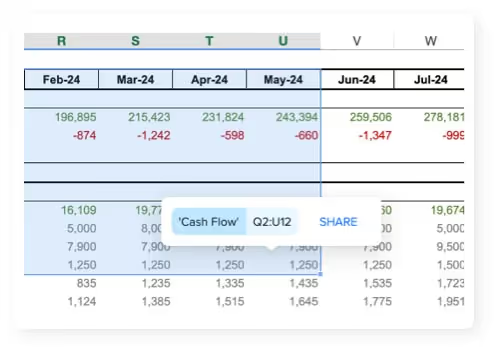
The regional owner opens the link in a browser and sees their inputs and the results you chose to show, nothing else. The other regions' numbers, the assumptions sheet and your formulas never reach their browser, so there is no structure to break and no hidden sheet to stumble over. Because recipients cannot rename sheets or insert columns in an app, the Friday deadline stops producing format repairs.
A few settings do the routing work. When you create a link, you choose who can open it; for a forecast round, the access level to pick is "Specific people or domains", which admits only the addresses you list (or a whole domain like @yourcompany.com) after a 6-digit passcode sent by email, with no account or password needed. Each link also answers the question "Should the data be editable?": the regional owners get Editable links, while the VP who only wants to watch the roll-up can have a Read Only one pointed at the summary. And each link carries a title and a message that appear above the app, which is a decent place for "Commit numbers only, pipeline review is Thursday".

The numbers flow back without a merge step. Connect the master workbook as a Microsoft 365 file from OneDrive or SharePoint and the link is live in both directions: every app run reads the latest version of the file, and values entered in the app are written back into the workbook through Microsoft 365, using your file permissions (writing needs edit access to the file). Edit an assumption in Excel on Wednesday, and the apps calculate with it on their next load. The trade-off is speed, since a live-connected app talks to Microsoft 365 while it runs; a hosted copy calculates faster in the browser, but for an internal forecast round, always-current beats fast.
One behavior worth knowing before the first round: shared links serve a snapshot of the app, the version you last published, so you can rearrange the input layout mid-week without twelve people watching your edits. When the new layout is ready, "Update these invitation links" pushes it to every link at once.
The checklist, then the first round
A sales forecast template is ready to leave your desk when it passes five checks: inputs separated from logic, assumptions in one visible block, a FORECAST.LINEAR baseline to argue against, a roll-up with no typed constants, and a named owner for every input block. That last check is the bridge to collection, because a block with an owner can become a link with a recipient.
Then run the first round small. Keep the master in OneDrive, publish two regions as editable apps, and let one cycle go through before you switch all twelve. The template part takes an afternoon; the part your team will notice is the Friday when the numbers are simply in the workbook. The Excel sharing page shows the setup end to end.