

Most lists you find when searching for an AppSheet alternative or a Glide alternative are written for people picking their first no-code tool. This one is for a different reader: your team already has the business logic. It sits in a pricing workbook, a quoting sheet, or a capacity planner, refined over years. AppSheet and Glide can both turn that spreadsheet's data into an app, but neither runs the spreadsheet's logic. That one difference decides which alternative fits.
Why Excel-First Teams Look for an AppSheet or Glide Alternative
Credit where it is due: both are good products. AppSheet, now part of Google Workspace, is strong for mobile field apps with offline mode and automation bots. Glide builds some of the most polished mobile interfaces in no-code. If you are starting from a blank page, either can serve you well.
The friction starts when your logic already exists. AppSheet treats your spreadsheet as a data table and expects app behavior to be rebuilt in its own expression language. Glide does the same with computed columns. A pricing model with 40 interlinked formulas does not transfer; it gets re-implemented, re-tested, and then maintained in two places. Every future change to the Excel original has to be mirrored by hand in the app.
Pricing is the second trigger. AppSheet starts at $5 per user per month, Glide at $25 per month with per-user tiers above that. For an internal tool used by ten people, fine. For a calculator on your public website or a form filled in by hundreds of partners, per-user pricing is the wrong shape entirely.
What to Compare Before You Switch
Fit matters more than feature count. Four questions separate the tools below:
- Where does your logic live? If it is in Excel or Google Sheets formulas, a tool that runs them natively saves days of rebuilding. If there is little calculation, this criterion drops away.
- Who uses the app? An internal team of eight tolerates per-user pricing and login walls. Customers, prospects, and partners need a public link or an embed, priced so that usage can grow.
- Mobile app or web app? AppSheet and Glide are mobile-first. If your users sit in a browser, or the app belongs on your website, a responsive web app is the better format.
- Where may the data go? If GDPR or client contracts constrain you, check hosting region and whether the file has to be uploaded at all.
Five Alternatives, Honestly Compared
1. airrange — when the logic already lives in a spreadsheet
airrange turns Excel models into web apps without touching the logic: you upload an .xlsx or import a Google Sheet, and the workbook itself stays the calculation engine. Modern functions and dynamic arrays such as XLOOKUP, FILTER, and LET keep working, and anything airrange cannot calculate is flagged at import instead of failing silently later. In the app builder you connect sliders, dropdowns, and number fields to cells; visitors use the interface and never see your sheets or formulas.
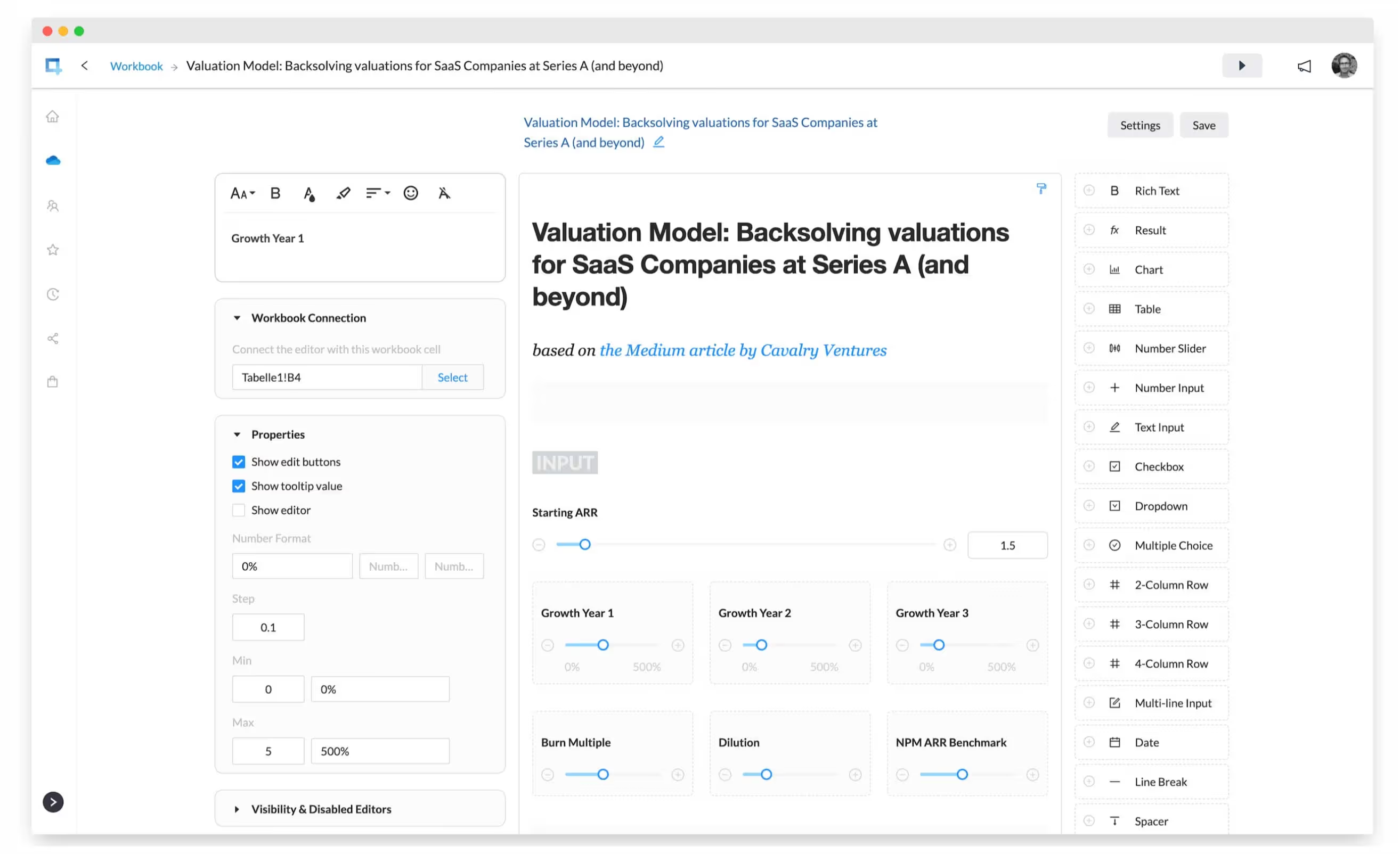
Two structural differences from AppSheet and Glide stand out. First, apps are responsive web apps you can embed on any website, not installs. Second, pricing is per creator, not per user: unlimited people can view and use a shared app on every plan, building is free, and publishing starts at €59/month. Hosting is in the EU (Frankfurt), and for workbooks that must not go to any cloud, the "Connect a file on your computer" option reads the file directly from your device without uploading it.
To be honest about the trade-offs: offline support is partial (apps have to start online) and there are no built-in automation bots, the two areas where AppSheet genuinely leads. The detailed head-to-heads are here: airrange vs AppSheet and airrange vs Glide.
Best for: calculators, quoting tools, and financial models that exist in Excel or Google Sheets and need to reach customers or partners.
2. Microsoft Power Apps — for enterprises deep in Microsoft 365
If your organization runs on Microsoft 365 and has an IT department willing to own the platform, Power Apps is the heavyweight option: connectors into hundreds of systems, Dataverse as a proper database, and enterprise governance. The costs are a real learning curve (Power Fx is its own language, and Excel formulas do not carry over), licensing that takes a spreadsheet of its own to understand, and per-user pricing.
Best for: internal enterprise apps with IT ownership and complex system integrations.
3. Softr — for portals on top of Airtable or Google Sheets
Softr assembles client portals, member directories, and internal knowledge hubs from pre-built blocks faster than almost anything else. Calculation is not its game: logic beyond filtering and simple rollups has to live in the underlying Airtable base or Sheet, and there is no Excel support.
Best for: client portals and directories where presentation matters more than computation.
4. Retool — for internal tools when you have developers
Retool is the fastest way for a developer to build an admin panel or ops dashboard on top of SQL databases and APIs. That sentence contains its limitation: it assumes a developer. Business users will not assemble Retool apps themselves, and the product targets internal tools rather than public, customer-facing apps.
Best for: engineering-supported internal tooling over databases and APIs.
5. Budibase — for self-hosted internal tools
Budibase is open source and can run entirely on your own infrastructure, which makes it attractive where data may not leave the building at all. Like Retool, it is oriented toward forms, CRUD screens, and admin panels, and setup plus maintenance are technical work.
Best for: teams with technical resources that need self-hosted internal apps.
Quick Comparison
| Tool | Spreadsheet logic | Pricing basis | Best fit |
|---|---|---|---|
| airrange | Runs Excel & Google Sheets formulas natively | Per creator, unlimited viewers | Customer-facing calculators & models |
| Power Apps | Rebuild in Power Fx | Per user | Enterprise internal apps |
| Softr | Lives in Airtable/Sheets, light | Per app/tier | Portals & directories |
| Retool | None (SQL & JavaScript) | Per user | Developer-built internal tools |
| Budibase | None (forms & CRUD) | Free/self-hosted tiers | Self-hosted internal tools |
Choosing by Fit
Match the tool to the job instead of the longest feature list. If your app is really a spreadsheet model that other people need to use safely, airrange is the shortest path, because the model is already finished; only the interface is missing. If you need offline field apps with automation, staying with AppSheet is a defensible choice. Polished mobile experiences for small teams remain Glide territory, enterprises inside Microsoft 365 should evaluate Power Apps, and portal builders are better served by Softr.
The cheapest way to decide is to test with your own workbook rather than a demo dataset. Building in airrange is free: open your Excel file at app.airrange.io, connect a few inputs and results, and see whether your model survives the trip intact. That one afternoon tells you more than any comparison table.