

Shadow IT is any application, service, or device used for work without the IT department's knowledge or approval. Most lists of shadow IT examples lead with unapproved SaaS subscriptions, and those belong on the list. But walk through a finance, sales, or operations department and the most common example is older and quieter: the spreadsheet. Excel files carrying real business logic move through inboxes every day, outside every access control the company owns, and no software inventory flags them. The list below starts with the usual suspects, but the entries that matter are the last two, and the fix for them is not a ban.
Six shadow IT examples, from obvious to invisible
1. Unapproved SaaS subscriptions. A team expenses a project tracker, a designer signs up for a free file-conversion service, sales trials a tool with real customer data. This is the example most security content is written about, because it is the one a network or expense report can detect.
2. Personal cloud storage. Files copied to a private Dropbox or Google Drive to work from home, or onto a USB stick for the road. The copy outlives the project, and sometimes the employment.
3. Messaging apps for business. Client conversations that migrate to WhatsApp or a private phone number, where retention policies and legal hold cannot follow.
4. Personal AI accounts. The newest entry: internal documents and code pasted into a free-tier chatbot under a private login, outside any data processing agreement.
5. The macro only one person understands. An analyst automates a monthly report with VBA. Three years later the process depends on a script nobody else can read, running on one specific laptop.
6. The emailed spreadsheet. A pricing model sent to a reseller. A cost calculator forwarded to an agency. A forecast template mailed to twenty regional managers and collected back by hand. Sometimes the website's prices themselves come out of a workbook someone recalculates and pastes into the CMS.
The first four are procurement and policy problems: real, but solvable with vendor reviews, SSO, and clear rules about what data goes where. The last two are different in kind. The tool is approved, sanctioned, and sitting in every Office installation. It is the usage that is ungoverned. Auditors have a name for this category, end user computing risk, and they treat it as its own discipline precisely because no vendor review will ever catch it.
The spreadsheet risk profile: why files beat apps at leaking
Spreadsheet shadow IT concentrates four risks that the SaaS variety mostly does not.
There is no access control inside a file. An .xlsx opens entirely or not at all. You cannot grant someone three input cells; you hand over every tab, every formula, every hidden sheet. Hidden is a display setting, not a permission, so the payroll tab you concealed before sending travels with the file and unhides in two clicks.
The logic leaves with every attachment. A pricing workbook contains your margins and your discount logic, readable in the formula bar. Forwarding it costs the recipient nothing, and once two copies exist outside your company you will never know how many there are.
Nobody can say who changed what. Emailed copies have no shared history. When the consolidated forecast is wrong, the trail is a folder of files named final, final_v2, and final_v2_JK, and the answer is an afternoon of cell-by-cell comparison.
Key-person risk compounds quietly. The model and the macro encode how the business actually calculates. When their author leaves, the knowledge goes with them, and the file keeps producing numbers nobody can verify.
Why banning Excel fails
The reflex answer is to lock it down: block attachments, mandate the BI tool, rebuild the models as proper software. In practice every one of these runs into the same wall. The people building these workbooks are domain experts doing their jobs, and the models exist because a controller or a sales engineer could express logic in Excel faster than any request-a-feature process could deliver it. IT cannot rebuild hundreds of living models, and the backlog for the ten it can rebuild is measured in quarters.
A ban does not remove the need; it relocates it. Shadow IT grows wherever the sanctioned path is slower than the job demands, so the forecast moves to a personal laptop and the pricing file gets renamed before it goes out. You end up with the same spreadsheets, minus the visibility you had when they at least sat on the file server.
Governance that works: keep Excel, govern the sharing
The workable policy separates two roles that the emailed file collapses into one. Experts keep building and owning their models in Excel, because that is where the expertise lives. Everyone else (colleagues, resellers, agencies, customers) gets a controlled interface to the model instead of a copy of it.
This is what granular sharing does in airrange: you select the ranges that others actually need, a handful of input cells and a results area, and publish exactly those as a small web app. Recipients open a link in the browser and see only what you chose to show. They do not need Excel, and they never hold the file, so the other tabs and the formulas behind the results stay in the master workbook. It works with local and on-premises Excel files as well as Microsoft 365 files, in any Excel version that can run add-ins from the Microsoft store.
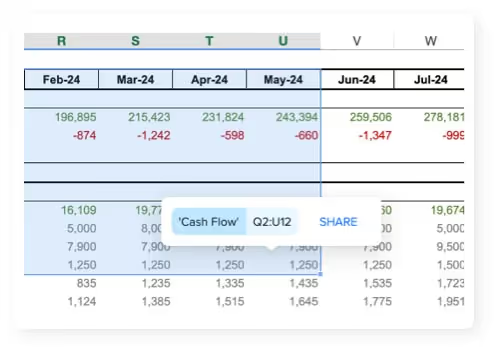
The controls a file cannot carry come with the link. Access can be restricted to specific people or whole email domains, verified by a 6-digit passcode sent to the recipient's address, and links can carry an expiry date. Revoking access means editing a list, not recalling attachments. And when contributors enter numbers, the owner reviews each proposed change and merges the accepted ones back into the workbook from inside Excel, which gives the process the audit step that file copies never had: you can see who entered what before it touches the model.
Deciding where the data lives
End user computing risk conversations with auditors go better when you can point at a deliberate storage decision instead of an inbox, so it is worth being precise about what sits where.
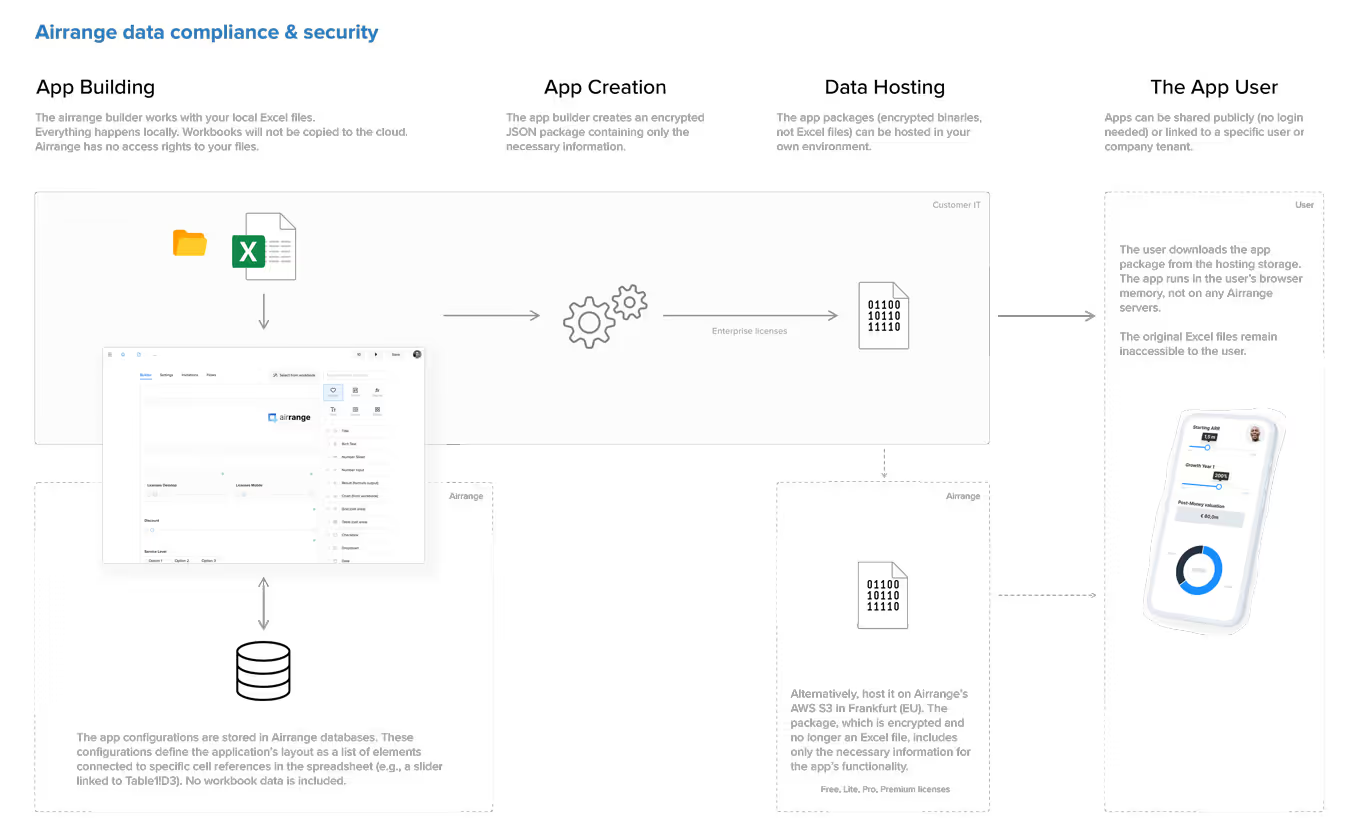
A local or on-premises workbook is never uploaded: airrange opens it directly in the browser, and its servers store only metadata about the app, for example that a combobox is linked to cell C3, not what C3 contains. A Microsoft 365 workbook stays in your own tenant, and access follows your existing Microsoft 365 permissions. Hosted workbooks are stored encrypted on AWS in Frankfurt, in the EU, and on Enterprise plans the encrypted calculation packages behind shared apps can live on infrastructure you control. The compliance and security page spells out each model, so you can hand it to whoever reviews vendors.
Where to start
You do not need a company-wide program to shrink spreadsheet shadow IT. Start with an inventory question your mail server can almost answer: which workbooks left the company as attachments last quarter, and which of them carry pricing, salaries, or margins? Pick the one with the most recipients or the most sensitive logic and publish it as a web app instead of mailing the next version. The expert keeps the workbook, the recipients get a link that shows them exactly their part, and for the first time you can list who has access, because it is a list, not a guess about forwarded copies. That is the difference between shadow IT and IT: not the tool, but whether anyone can say where the data is.